
Upload your SmartMeter data
We'll analyze every Texas electricity plan against your real usage.
Don't have your file yet?
Log in at smartmetertexas.com. Your meter appears on the dashboard. Then:
- 1. For Report Type, select Energy Data 15 Min Interval.
- 2. Set the Start date to one year ago.
- 3. Select Submit Update.
- 4. Select Export My Report to download your usage file.
Show me where to click
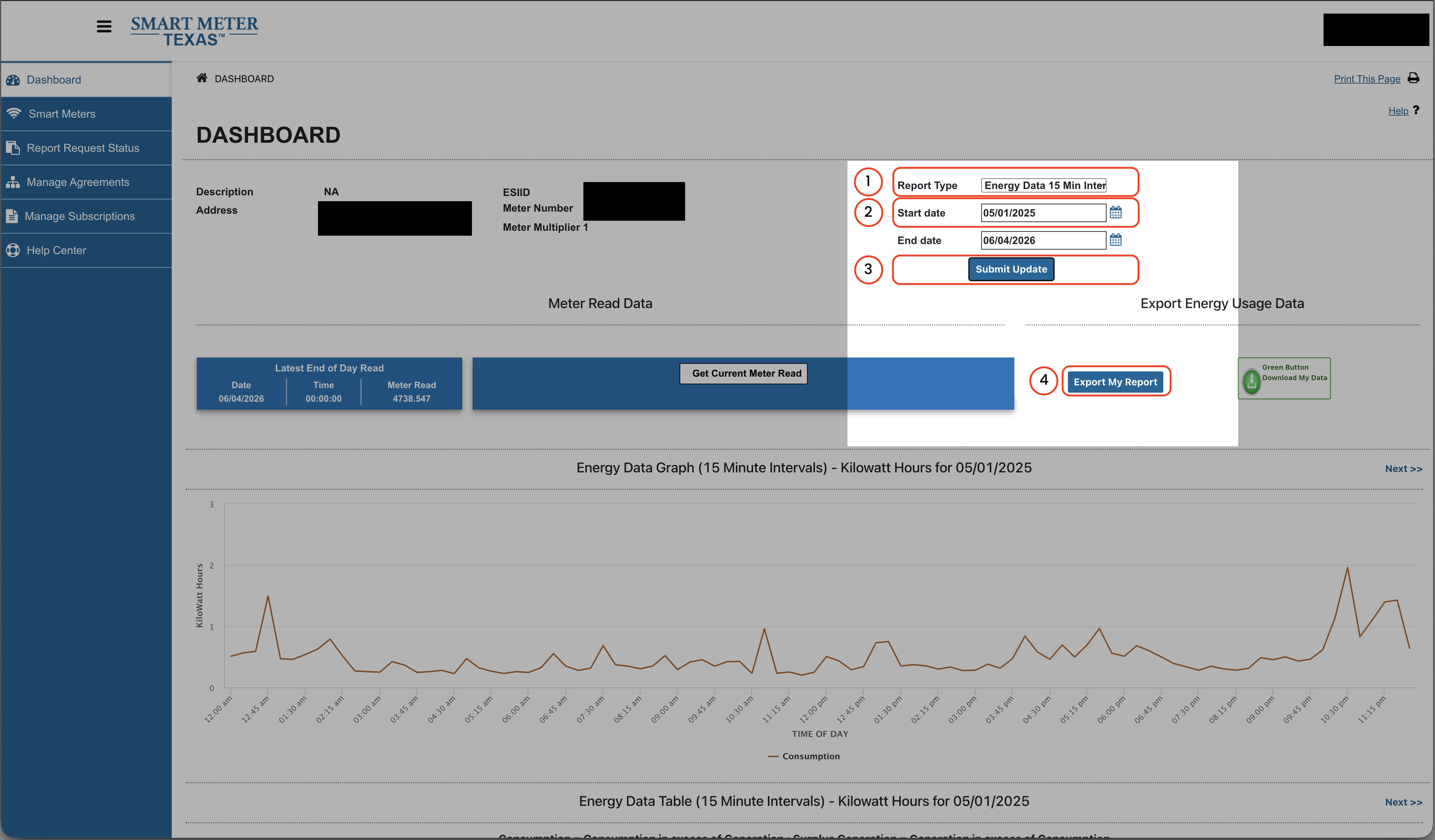
Select the image to open it full size.
15-minute interval data gives the most accurate free-nights/free-days ranking. Daily and monthly files also work, but time-of-use rankings will use estimates instead of your actual hourly usage.
Enter the expiration date shown in your provider account or expiration notice.
Enter a rate between 1 and 99 ¢/kWh.
We'll show how much you could save by switching.
Free file check and usage summary. Full personalized plan ranking is $9.99 one time.
Drop your SmartMeter file here
Supports .csv from Smart Meter Texas
No account needed · Secure upload · Deleted within 5 days
WattPal is independent and receives no referral fees from electricity providers.
Reading your usage data…
Parsing 15-min intervals
Upload failed
Something went wrong. Please try again.